Sprint closing and velocity
Close the sprint, read its summary and velocity, and find the sprint and release notes.
At the end of a sprint, the Product Owner or the Scrum Master closes it from the Planning view. Closing freezes the sprint’s summary, records who closed it and when, and prepares the next one.
Close the sprint
On the active sprint, Close the sprint, then Confirm closing (rule PLN-008):
- a story awaiting validation moves to the next sprint and keeps its state: the business validation delay stays visible;
- the other stories not validated go back to Planned in the next sprint;
- after the last sprint of a release, those stories return to the top of the backlog, the release ends, and a story awaiting validation moves to the first sprint of the next release; if there is no next release, closing is refused while a story is awaiting validation (rule PLN-013);
- unfinished urgent tasks follow into the next sprint.
The next sprint does not start on its own: Activate the sprint starts it. After a release ends, the Product Owner first activates the next release.
The summary and velocity
A sprint’s velocity is the sum of the points of the stories validated during that sprint. A story validated in sprint 2 counts in sprint 2, even if its work started in sprint 1. A sprint can therefore have a low velocity while the team has finished its work, when business validation is slow.
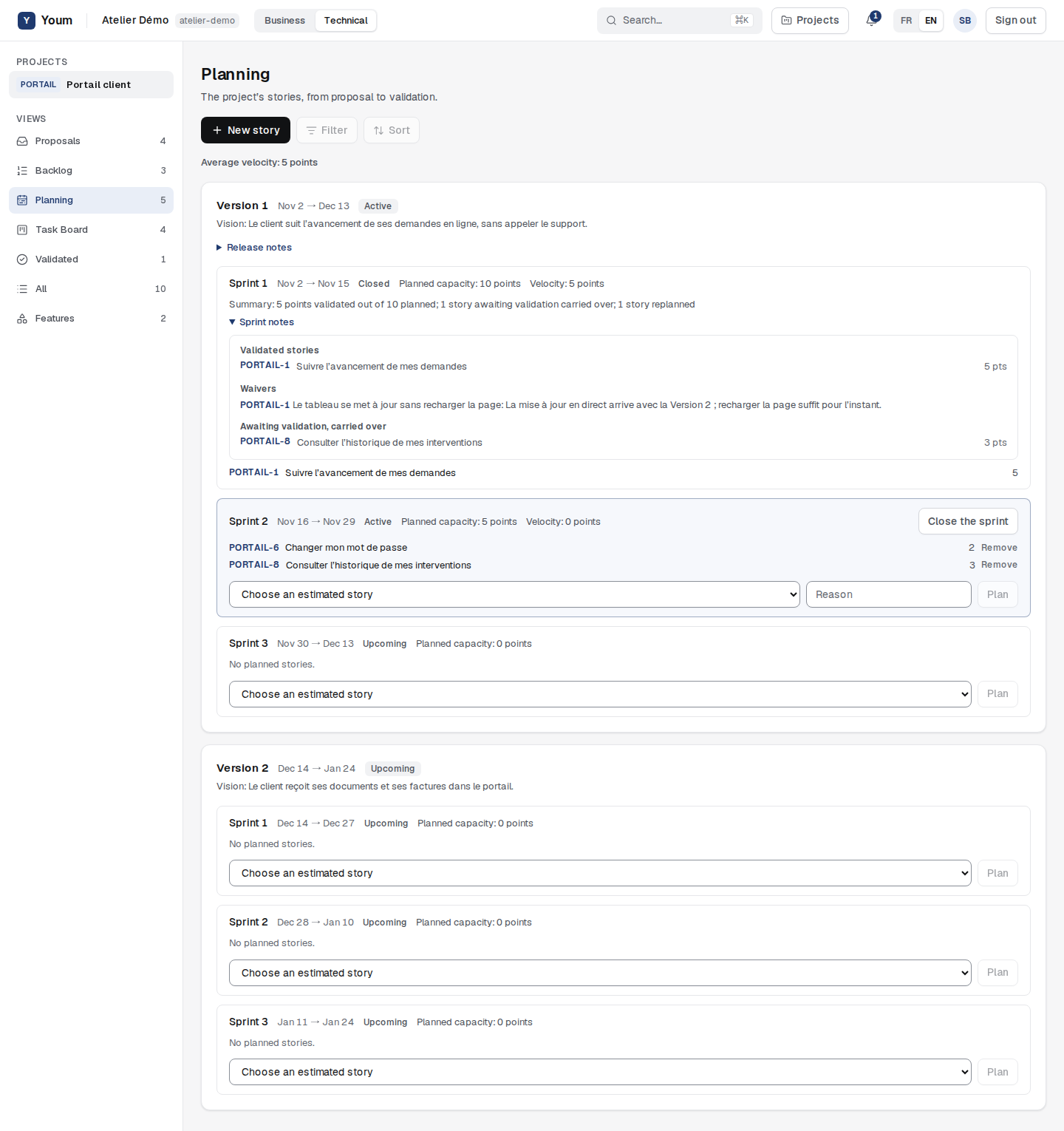
Once the sprint is closed, its Summary shows the points validated out of the points planned, the number of stories awaiting validation carried over, and what was replanned or returned to the backlog. This summary is frozen: a later validation no longer changes it. The Average velocity of closed sprints shows at the top of the view.
Sprint and release notes
Sprint notes lists the stories validated during the sprint, with their points, and each waiver with its test and reason. Release notes gathers the notes of the release’s closed sprints, and the stories awaiting validation carried over by its last closed sprint.
Cancel a validation
The Product Owner can cancel a validation from the story’s details, in the Technical view, with Cancel the validation, only during the sprint in which it happened (rule ACC-008). A validation made outside any active sprint counts in no velocity and cannot be cancelled. The story goes back to Awaiting validation. Once that sprint is closed, a problem is reported as a new defect.