Working together
See other people’s changes live, and what happens when two people edit the same request.
Youm updates on its own. When someone proposes, edits, accepts or validates a request, the other people looking at the same project see the change in less than two seconds, without reloading the page. Only people who can see the project are notified: nothing crosses from one organisation to another.
The flaps
When a request’s status changes, whether you or someone else changed it, its label flips letter by letter, like the flaps of a departure board. If you asked your device to reduce motion, the new status shows straight away, without flipping.
When two people edit the same request
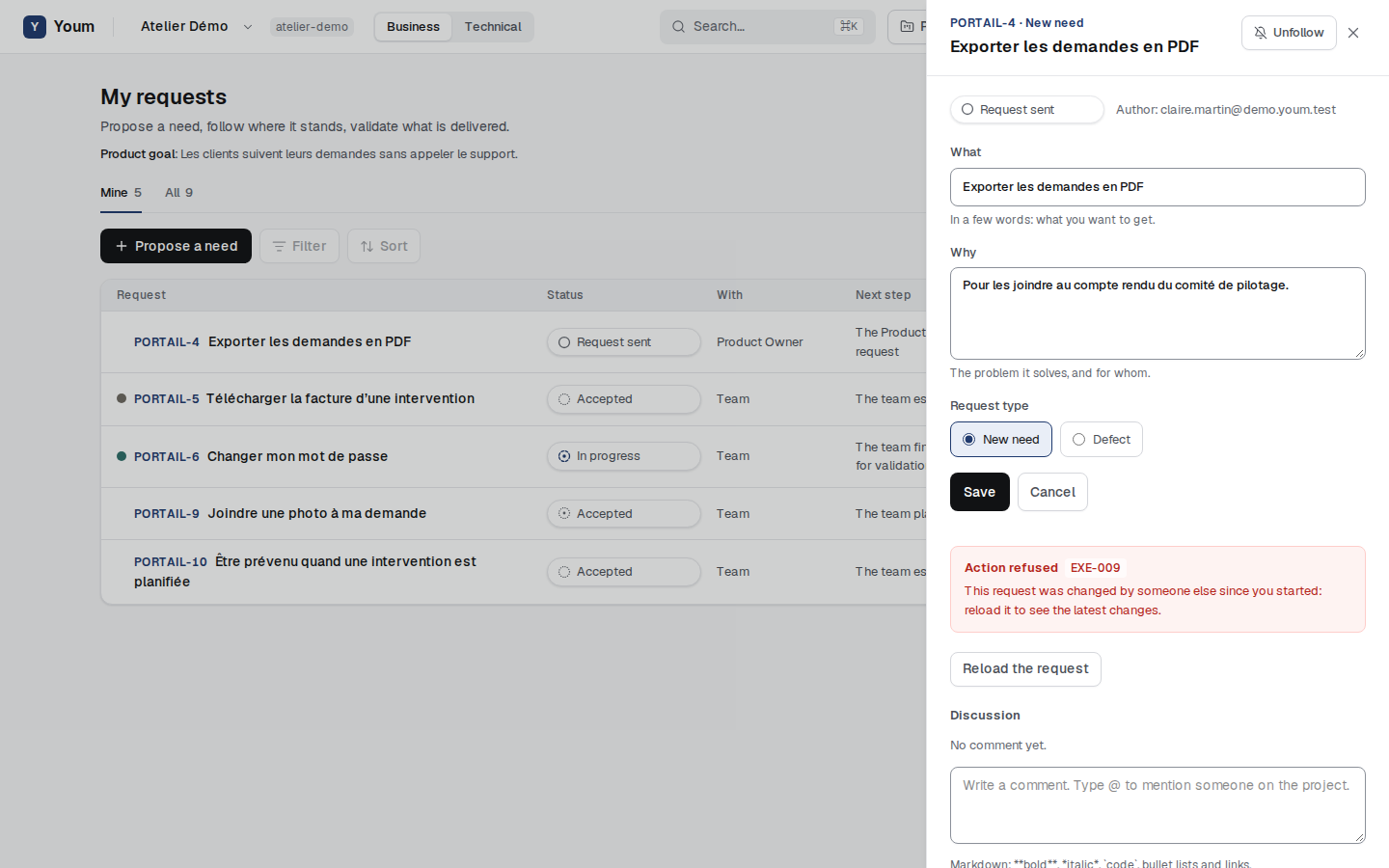
Youm remembers the request as it was when you started editing it. If someone else changes it in the meantime, your edit does not overwrite theirs: it is refused (rule EXE-009), with a message explaining why, and the Reload the request button shows the latest changes. You can then redo your edit from there.
The same protection applies to estimating a story. For other actions, such as accepting, planning or validating, Youm checks when saving that the rule still holds, and explains its refusal otherwise.